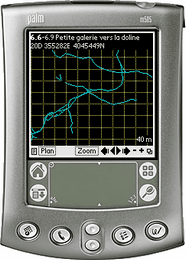
 Auriga is a cave survey freeware for PDAs (Personal Digital Assistants) running under Palm OS. Auriga is designed for in-cave use as a smart survey notebook: as the survey goes, Auriga displays the line plot in graphical form, reports statistics, helps spot and fix survey errors and assists in sketching to scale. Bidirectional data exchange with Compass and Visual Topo is automated.
As of 24 February version 2.03 is available for download here.
Continue reading to see what's new.
New features
* sketch element grouping implemented; Group tool/mode reached by
  holding down stylus on sketch tool (3rd to the right) in Map
* stylus trace interpolated to sketch smoother curves
* sketch stays displayed when switching Map mode to a transient mode
  (Span, Line, Spot or Path) even if sketch is disabled in display
  options
* when inputting a GPS position in Survey Shot form, leaving the data
  connection active averages the position
* ITRF92 datum added in new Grids.pdb
* option "Disable External Search" added in Cave Details form
* option "Current Shot" added to Search form when launched from Survey
  Shot form
* smarter pattern-finding algorithm in Global Find and Select forms
  now allows finding * and ? characters even when wildcards are used
* options "Convert Sketch" and "Convert Splay Measures" added in Shots
  view of Operations form
* option "Export Itinerary" added in Loops view of Operations form
* options "Add Attributes" and "Remove Attributes" added to Caves view
  of Operations form
* options "By Absolute Error" and "By Relative Error" added for
  overall, horizontal and vertical loop errors in Loops view of Select
  form
* if only one loop in cave, it is automatically set as the current loop
* the "Export as New Cave" option in Loops view of Operations form
  now allows exporting to memory card
* scale and North arrow added to SVG export of Map
* SVG and DXF scales based on overall map width
* Auriga Keypad used for Projection and Path modes in Map
* Auriga Keypad now tolerant when using the a-b-c icon for a numeric
  field of the 1-2-3 icon for an alphabetic field
* Sessions form operates in read-only mode when called from Map
  (it could cause too much trouble otherwise)
* number of search results, survey shot errors or survey shots in loop
  or path displayed in title bar
* "Subtract One" station auto-incrementation mode added to Cave
  Details
* in Main form, the Beam menu item also allows beaming Auriga
  components (software, language resources, math library, datums and
  preferences)
* when called from Main form, Export and Beam forms allow exporting or
  beaming selected caves (in Caves view of Selection form)
* option "Update Only" added to Export form to only update existing
  survey shots or sessions in target cave(s)
* "Caseless" and "Wildcards" checkboxes selected by default in Search
  form
* sketch "objects" renamed "elements" to match GIS terminology
Bug fixes
* undoing a Scissors operation in sketch could erase all sketch
  elements for the current survey shot
* ignoring the unsaved survey shot alert before returning to Map in
  Sketch mode could erase all sketch elements for that survey shot
* the Survey Shot form did not self-adapt to a virtual shot when
  receiving GPS data while displaying an empty regular survey shot
* in Section view in Map, if all non-zero passage dimensions and splay
  measurement were on the same side of the station, the wall outline
  and the automatic polygon in Sketching mode excluded the station
* in certain cases, a station could show in Map or export in DXF more
  splay measurements than it really had
* zooming the Map would sometimes hide sketch elements even though
  their parent survey shot crossed the screen
* creating a new session and leaving it unsaved while in Map form
  would later crash sketching
* the extended profile SVG export was truncated
* in the DXF export, passage heights and sketch ignored the
  "Keep Origin XYZ" checkbox
* in the SVG export, the sketch would appear away from the line plot
  if the cave had a non 0,0,0 origin
* passage heights could appear huge in profile views in the DXF export
* the Map did not follow well the (connected) GPS position
* text styles (underlined, framed, etc.) did not use text color in
  sketch
* wrong number of total steps displayed when searching for a path in
  Map form
* when there was no middle station, the path computed in the Map
  showed an impossible middle station name
* it is now possible to interrupt the search of a path in Map
* better interface for the bulk restore of PDBs from memory card
* better handling of the Aceeca PDA32 keys
* the sketch selection rectangle could leave a ghost trace in Map
* selecting a sketch element could leave the previously selected
  survey shot highlighted in Map
* in certain cases, it was possible to have more than one tool
  selected in Map
* caves with an uppercase PDB extension were not recognized for
  restore from memory card
* logs could no longer be exported as memos
* the Palm OS Global Find (launched outside of Auriga) did not search
  Auriga caves or networks
* fields in the Measures form accepted letters (although refused when
  attempting to save)
* using the Up or Down buttons in the Auriga Keypad while inputting a
  sketch layer name would crash
* an unnamed hidden sketch leyer could be selected as current layer
* exporting the cave while in Map in Sketch mode could crash
* minor overlaps fixed in Preferences, Element Details (sketching)
  and Export forms
Reference manual
* Group mode and Group tool documented in sketch
* changes to beaming and data export